claude-agents-bar: every Claude Code session, in the menu bar
A SwiftBar plugin that shows which Claude Code sessions are working, waiting on you, or done - built on hooks and JSONL transcripts alone.
VSCode has basically become my operating system. Most of the day runs through it: agents working on stuff in the background, MCP servers I'm switching between, the same codebase under analysis from a couple of angles at once. Idling on a slow session isn't really a thing anymore - I just keep two or three going at the same time. That's the shape of the day.
Which means at any given moment there are a few Claude Code sessions open. One on the main branch, one or two in worktrees, sometimes a long background one on a refactor. The one waiting on me is almost never the one in focus. The built-in sidebar (same anthropic.claude-code extension under VSCode, VSCodium, Cursor) only sees the workspace it lives in. ⌘-Tab between windows looking for the yellow dot works for two sessions and falls apart by the fourth. So I built a menu-bar widget that answers one thing: which session needs me right now. No focus stealing, no floating panel.
Most of the noise around Claude Code right now is about autonomous fleets: orchestrators, self-directed pipelines, swarms eating backlogs. My day-to-day is smaller. Three or four sessions, a couple I'm actively pairing with, the rest doing their thing. What I needed wasn't orchestration. It was a way to glance at the menu bar and see which of the things already on my screen wants me.
It's called claude-agents-bar. A SwiftBar plugin (Python, stdlib only, 3.9-compatible because that's what /usr/bin/python3 is on Sequoia), a bash hook that writes session events to a TSV, a small CLI with setup / teardown / doctor, and per-row action scripts. Started as a single file. Grew into a package once I started relying on it daily, which forced me to write tests and an ADR tree so I could remember why I'd made certain decisions a month later.
Where the sidebar stops working
The Claude Code sidebar is fine for telling you what the current session is doing. It can't tell you that two windows over there's a session blocked on a permission prompt, or that the one in the other Space finished an hour ago and you've already forgotten about it.
Things I tried before writing this:
- ⌘-Tab cycling. Fine for two sessions. The yellow-dot signal lives inside each window, so past three you're focusing every one of them just to check.
- Floating panel apps. Pull focus, take screen space. The point of running things in parallel is that I don't want to look at any of them most of the time.
- OS notifications. Interruptive and ephemeral. By the time I look up, I've lost the bit of state I needed.
A menu-bar widget was the smallest thing that fit: a counter you can read at a glance, plus a dropdown when you want detail. No daemon.
What it shows
In the menu bar:
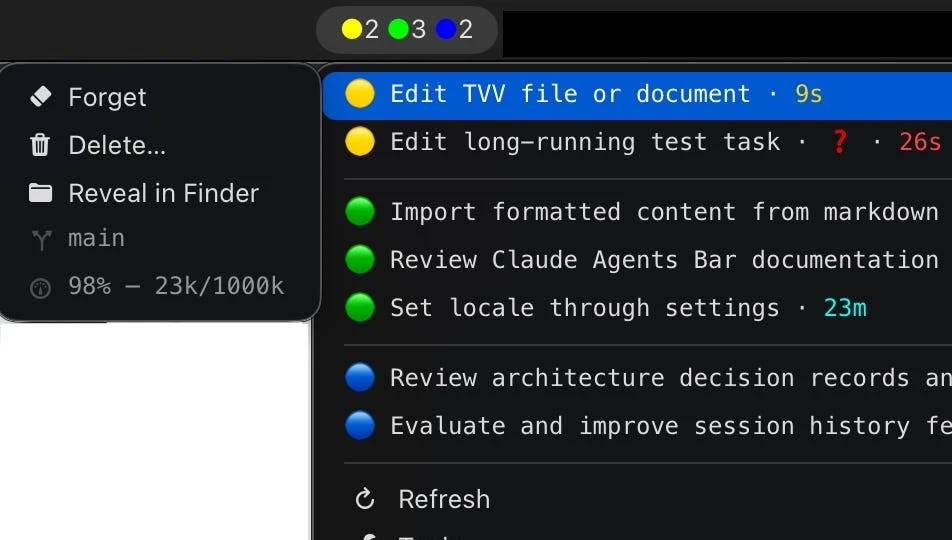
◐ 🟡1 🟢2 🔵1- 🟡 - sessions that need attention right now (working, or waiting on a permission prompt).
- 🟢 - sessions that just finished, you haven't seen them yet.
- 🔵 - sessions you've acknowledged but are still in active follow-up.
When nothing is urgent, the icon goes dim and the title stops drawing your eye.
The dropdown lists every session that touched disk in the last few hours, ordered by urgency. Each row shows the session's first user prompt as a title, the colour, and time since the last event. Clicking opens the project folder in your editor (VSCode by default; VSCodium and Cursor by setting editor_url_scheme). Past 80% context usage the row picks up an inline ⚠ {pct}% warning, red past 90%. Useful for catching a session that's about to auto-compact before you give it another task.
The per-row submenu has mark-as-read, forget, delete, and reveal in Finder. On hover the row shows git branch and context %. The hover tooltip on the context line shows the session's last tool_use (Read: main.py, Bash: pytest …), so you can see what it's doing without clicking in.
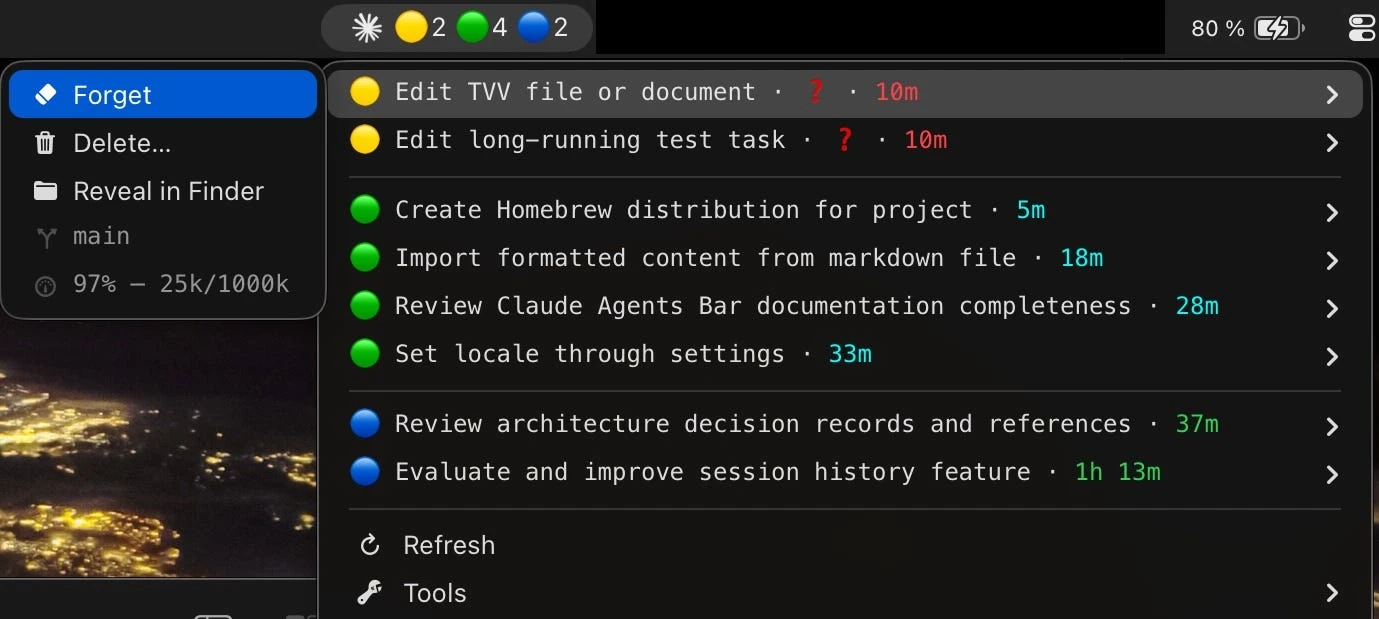
A Tools submenu adds bulk actions (acknowledge all, forget all) plus a summary of what happened today.
System notifications cover the transitions that matter: a session finishing a long task, a permission prompt waiting on you. Each message is a short phrase pulled from the locale files - plain JSON, straightforward to edit if you want different wording. I've tuned mine more than once. Low-stakes customization, but unexpectedly satisfying to get right.
How it works
Polling, 5-second tick. The plugin reads two things from disk:
~/.claude/projects/*/*.jsonl: the transcripts Claude Code already writes. That's the source of the session title and the project path.~/.claude/agent-state.tsv: a sidecar that the Claude Code hook (hooks/agent-state.sh, bash) updates on each session event (SessionStart,PreToolUse,Stop, and so on).
Both files are append-only. The plugin rebuilds the menu from disk every tick and exits. State that has to survive across ticks (which sessions you've acknowledged or forgotten) lives in three more sidecar files of the same shape.
So there's no daemon and nothing to keep alive between ticks. If the plugin crashes, SwiftBar respawns it on the next 5 seconds.
Hooks and JSONL are the whole API
One thing I want to flag specifically: this tool only exists because Anthropic shipped a few primitives I could lean on. Worth being concrete about which ones.
The hook system is a small set of events you register in ~/.claude/settings.json: session lifecycle (SessionStart, Stop), tool lifecycle (PreToolUse, PostToolUse), permission gates. Each event runs a shell command and gets the relevant context on stdin. That's the entire surface, no plugin framework above it.
Three consequences for anyone extending Claude Code from the outside:
- You can integrate sideways. Nothing of mine runs inside Claude Code. A bash one-liner writes a TSV row; an unrelated Python script reads it. Two processes that don't know each other exist.
- JSONL transcripts are stable enough to consume. I read session titles and
cwdstraight off them. No scraping, no private API. settings.jsonis just JSON, so my installer does an additivejqmerge with a timestamped backup and preserves whatever hooks the user already had. That wouldn't fly if hooks lived behind a config registry.
The pattern works because hooks are events on stdin and state is files on disk. I expect more sideways tooling around Claude Code over the next year; this is one early example.
Limits
Things it doesn't do:
- Sessions that were already running when you installed the hooks won't have live state. They appear in the list (from JSONL mtime) but sit at
idleuntil they emit their next event. I tried backfilling from transcripts and the guesses were wrong often enough that I pulled it out. - macOS hides menu-bar items behind the notch before it hides the system tray, so on smaller MacBooks the icon can vanish. There's a
compact: trueflag that drops about 30 px by swapping emoji counters for narrow ANSI bullets, but it's a workaround. - Remote sessions aren't surfaced. The plugin reads your local
~/.claude/. If you run Claude Code on a dev box, you'd have to mount that directory.
Install
brew install --cask swiftbar               # if not already installed
brew install alexey-krylov/claude-agents-bar/claude-agents-bar
claude-agents-bar setup
setup symlinks the plugin into SwiftBar's plugins directory, drops the hook script into ~/.claude/hooks/, and merges (with a timestamped backup) the hook entries into ~/.claude/settings.json. Idempotent, safe to re-run.
If something doesn't show up, claude-agents-bar doctor will tell you what's missing (jq, python3, SwiftBar.app, hook registration, sidecar freshness, editor app).
Screenshots and a live demo of the dropdown are on the project page. This post first appeared on Medium.
A long time ago I wrote Java integration posts on Habr - Guice with Spring Data, with Axon, some CLI tooling. This is the same instinct, scratching a tooling itch and writing it up.
Three months of daily use and I barely notice it's there - which is the point. The sessions that used to sit blocked while I worked on something else now surface in seconds. The notification that fires when an agent is waiting has started to feel less like a system alert and more like part of the conversation - the hooks are talking, the day has a rhythm. That kind of friction reduction is hard to measure and easy to feel. If the shape of your day looks anything like mine, hopefully it's worth an hour of your time.
Tags: Agents, Claude Code, macOS, Tooling
Read next
A console for the agent factory: a menu bar item and an editor extension
How to watch an agent pipeline without opening the tracker. What the menu bar shows, what moved into the editor and why neither of them stores anything.
From a script for myself to a product: five months of claude-agents-bar
What I had to add to a working script so that a stranger could install it. An installer, diagnostics, 21 recorded decisions and 16 releases.
An autonomous pipeline for Claude Code: from issue to merge
A queue of issues, headless sessions in separate worktrees, two gates and a merge into an integration branch. What came out of it and what had to be reworked.
Comments