A console for the agent factory: a menu bar item and an editor extension
How to watch an agent pipeline without opening the tracker. What the menu bar shows, what moved into the editor and why neither of them stores anything.
The pipeline that carries a task from issue to merge works without me, but I still have to watch it: tasks wait for plan approval, get blocked, leave manual steps behind. The tracker shows only the current label of a task, and I need the whole picture: what is waiting on me, what the agents are doing right now and where the pipeline is stuck.
Two tools grew out of this need: a bar in the macOS menu bar and an editor extension. The code lives in the factory repository, and for now it is a home project.
Why neither of them stores anything
They know nothing and store nothing themselves, they take everything from the factory backend. The state of a task is computed from facts in the tracker, and there must be no second copy of it, otherwise one day it will diverge from the first. Groups, tags and task order are also shared between the bar and the extension: a task marked in one looks the same in the other.
So both are tied to a single factory and are useless without its backend. A console like this is needed when the pipeline already exists and has to be watched every day; setting up a separate backend for its sake is not worth it.
The bar in the menu bar
The bar title has two numbers: how many tasks are in progress and how many are waiting on me. It turns red only in the second case. The menu is split by urgency, not by project:
🤖 2/4
├── Waiting on you (4)      plan awaiting approval, blocker, task from an agent
├── Do by hand (2)          PR merged, a manual step is left
├── In progress (2)         what the agent is doing this minute
├── Recently closed (4)
└── Outside the queue (2)   tracker tasks that were not handed to the factory
Each task shows the whole chain of phases with the time spent in each one, not only the current label. A task that has been waiting on me for more than a day turns red.
The state is shown by an icon at the start of the row, and it is an emoji: system symbols in a dropdown menu are drawn in one colour, their colour is ignored.
The editor extension
The bar is good for noticing, but to figure things out I had to open a browser. So everything that requires reading moved into the editor: the ticket, the plan and the PR changes open in tabs.
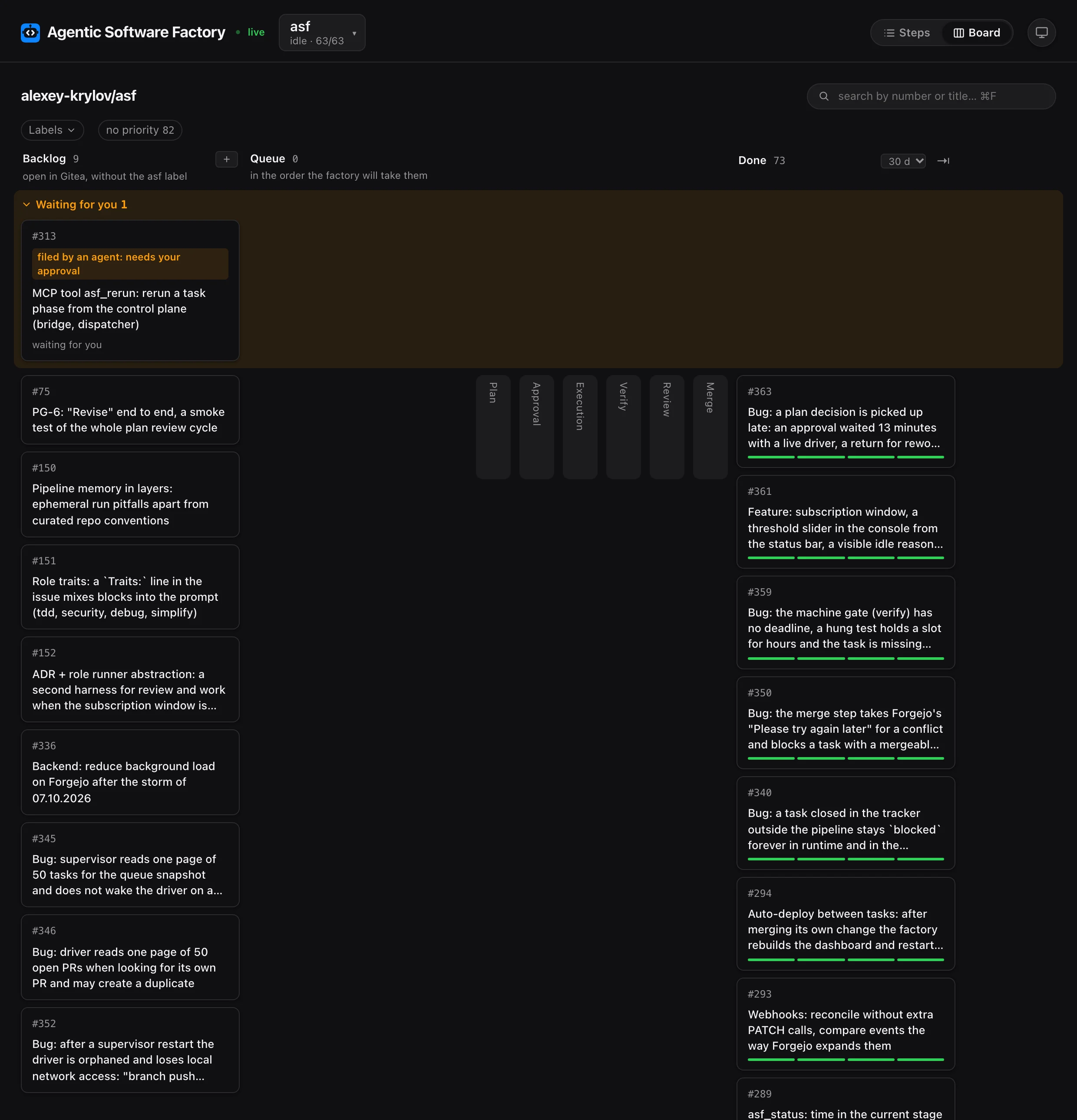
The task list is split into the same sections as in the bar. A task row is no taller than five lines, and in the compact view about two and a half times more tasks fit on the screen. The row carries the PR number, coloured by build state, and a counter of review returns: how many times the agent redid the work.
The work usually goes like this. The bar shows that there are tasks waiting on me. I open the plan in the editor and write remarks right on its lines, then there are two buttons: "approve" and "rework from notes". A blocked task shows the PR changes and the reason for the block, and a button removes the block. The queue order is changed by dragging rows. By default a double click opens a row, a single click only selects it.
While the agent is working, the editor shows its live log: text, tool calls, errors. The files it is editing right now are marked, and if I get into such a file, the extension warns me. A task can be created from code: a selection or a marked comment turns into a brief with a link to the lines. I can take over an agent session: continue its dialogue myself and then return the task to the factory.
The console is there too: a daily cap of tasks per project, pause, stop and the state of the model subscription window.
What doesn't work and what isn't verified
The editor did not see the factory, although the browser opened it. It turned out that on macOS the editor must have a separate permission for local network access. Now the extension suggests this itself when it sees such an error. Dragging a task into the chat with an agent may not get through in new versions of the editor; next to it there is a menu item that does the same thing.
A notification arrives once, in the window of the project the task belongs to. If the project is not open in any editor window, it will not arrive anywhere.
There are many tests (930 for the extension and 742 for the bar), but I never went through some of the features by hand in a live window. Tests and a sandbox do not replace that.
Two things are enough for every day: the bar shows that a task is waiting for me, and I read and reply in the editor. I do not have to open the tracker for that.
Tags: Agents, Automation, Claude Code, macOS
Read next
claude-agents-bar: every Claude Code session, in the menu bar
A SwiftBar plugin that shows which Claude Code sessions are working, waiting on you, or done - built on hooks and JSONL transcripts alone.
An autonomous pipeline for Claude Code: from issue to merge
A queue of issues, headless sessions in separate worktrees, two gates and a merge into an integration branch. What came out of it and what had to be reworked.
From a script for myself to a product: five months of claude-agents-bar
What I had to add to a working script so that a stranger could install it. An installer, diagnostics, 21 recorded decisions and 16 releases.
Comments