Segmenting a home network on MikroTik without VLANs
A second subnet on the same bridge, trusted devices by list, and services with their own address in the segment of the people who use them.
In this post I want to describe how I split my home network into trusted and untrusted devices without setting up VLANs. The need itself came up after an incident at the country house: one TV box was holding 5051 connections, and it became clear that any device in the subnet counted as "one of ours" on my network.
The TV, the smart speaker, the robot vacuum and the cat's water fountain had the same access to the home server and to the router's admin interface as my laptop.
VLANs were the first option I considered, and I rejected it because it brings switch reconfiguration and new SSIDs with it. A second subnet requires neither.
The idea
Isolation is done at L3: a second subnet on the same bridge. The switch, the access points and the SSIDs are left untouched, only the addresses change.
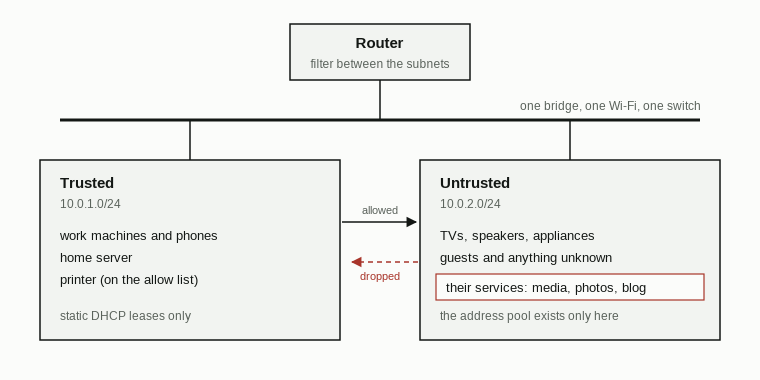
10.0.1.0/24- trusted: computers, phones, the server, the printer. Static leases only, there is no pool;10.0.2.0/24- untrusted: TVs, speakers, lamps, family members' devices, guests. The DHCP pool lives here as well.
The addresses here and below are placeholders. An unfamiliar device ends up in the untrusted segment on its own, because free addresses exist only there. Becoming trusted requires an explicit static lease.
There is still only one DHCP server: RouterOS does not allow two of them on the same interface. The segment is determined by the lease address.
What came out of it
The trusted list is filled by DHCP itself. A lease has an address-lists parameter, and the address is added to the list at the moment it is handed out:
/ip dhcp-server lease set [find address=10.0.1.50] address-lists=trusted-devicesThen come five filter rules, all restricted to in-interface=bridge:
- a limit on concurrent connections for an untrusted device, and a trace in a separate list for an hour;
- the actual drop of connections above the limit;
- an allow rule for a short list of addresses in the trusted subnet;
- a drop of everything else from the untrusted segment into the protected networks;
- a drop of the router's own admin ports.
The key one looks like this:
add chain=forward in-interface=bridge src-address-list=!trusted-devices \
    dst-address-list=protected-nets connection-state=new action=drop
In addition, there is a mandatory setting without which the router itself will tell an untrusted client to reach its neighbour on the bridge directly, past the filter:
/ip settings set send-redirects=noTwo points about the rules themselves are worth noting.
The threshold of 500 was not found on the first try. At the country house it was initially set to 200, and within the first 20 minutes a phone and a laptop belonging to family members tripped it. Even so, 500 is still ten times lower than the number that started all this.
The connection-state=new condition on the drop rule is mandatory. Without it the rule cuts the reply packets of connections that a trusted host initiated: monitoring checks, a stream from the server to the TV.
Services for untrusted devices
One catch remained: the TV needs the media server, and the media server lives on the server in the trusted subnet.
I considered opening a port on the server to untrusted devices a bad solution: behind port 80 there is a reverse proxy with all the internal sites, and separation by the Host header does not count as protection.
I decided to move the services themselves. A container gets its own address in 10.0.2.0/24: a Docker network in macvlan mode on top of the server's network card, with the address issued by the router's DHCP for the MAC pinned to the container.
The viewer and the service end up in the same subnet, forward takes no part in their communication at all, and the trusted-allowed-for-untrusted list still contains a single printer.
This is how the media server, the photo archive, music, the wiki and several more services moved. Later this blog moved there too.
Problems along the way
Almost all of them looked the same: the rule is correct and there is no traffic.
- the server did not get onto the trusted list. Its address is configured in the OS itself, it does not request one over DHCP, and its lease on the router had been sitting in
waitingsince 2024. I had to add the only static entry in the list. The check is simple: if a device is present in/ip arp printwhile its lease iswaiting, the address is set on the device; - the container-level
mac_addressis ignored in Docker 29, and only thenetworks.<network>.mac_addressform works. It also works only in a Compose file without aversion:line; - BBR. While the service lived in
network_mode: host, it inheritedtcp_congestion_control=bbrfrom the host. In its own netns the default iscubic. It was BBR that once raised a single video stream between home and the country house from 10 to 76 Mbit/s, so thesysctlsline in the stack is mandatory; - port publishing. Docker attaches a container's networks in alphabetical order and puts the port mapping on the first of them. If
lancomes first, the port on the host silently does not open, althoughdocker psshows it as published. The network'spriorityparameter does not change this order; set address=on an active lease erases itsdhcp-option-set. I caught it by eye inprint detail, and now I set the option set on the next line;- device discovery. I wrote in the documentation that mDNS would not travel between segments, and I was wrong: 17 devices answered a query, five of them from the neighbouring subnet, because L2 is shared. At the same time, the app of one of the speakers discards a foreign subnet by itself, and the speaker had to be returned to the trusted devices.
Downsides
The downsides of this approach are the following:
- there is no isolation within a single L2, neighbours in a subnet talk through the switch, past the router;
trusted-allowed-for-untrustedopens a whole address rather than a port;- the migration window is up to 30 minutes, until the devices renew their leases.
The right use case for this solution is protection against household appliances with someone else's firmware that scan the network by the usual rules. It will not protect against a person who is deliberately aiming at the network.
I rolled it out in stages: each stage is a separate .rsc file imported as a single transaction, with its own rollback file. I did the acceptance from the devices themselves rather than from the rules, because half of the problems in the list above are not visible in the rules.
I hope someone finds this useful.
Tags: Docker, MikroTik, Networking, Self-hosting
Read next
Where a network anomaly detector should live
A script on the router or logic in a flow collector that is already running - how the plan shrank by half and what a run over the history showed.
My own panel on a mobile router: one Go binary and 128 MB of memory
What I managed to do with a pocket LTE router, the Huawei E5885. A dependency-free panel in Go, ad blocking, a connection map, operator SMS and counters that lied.
Two Home Assistants with nothing between them
The apartment and the country house each got their own Home Assistant with no bridge between them. How one vendor account is split into two homes, why the country house stood without devices for twenty-five days, and what layered diagnostics does about it.
Comments