My own panel on a mobile router: one Go binary and 128 MB of memory
What I managed to do with a pocket LTE router, the Huawei E5885. A dependency-free panel in Go, ad blocking, a connection map, operator SMS and counters that lied.
A pocket LTE router, the Huawei E5885, travels with me: in a hotel, an airport or a cafe it shares internet from a SIM card or from someone else's Wi-Fi. This summer, including a vacation in Turkey, I built my own control panel for it. The result is a mobile router for a developer: I can see who is connected and how much they downloaded, how much is left of the data plan and of the battery, ads are blocked on the router itself, and client connections are drawn on a map, like in Little Snitch.
The code was written by agents under my direction. What to build, what to leave stock and what to give up was my call, and those decisions are recorded in the project documentation.
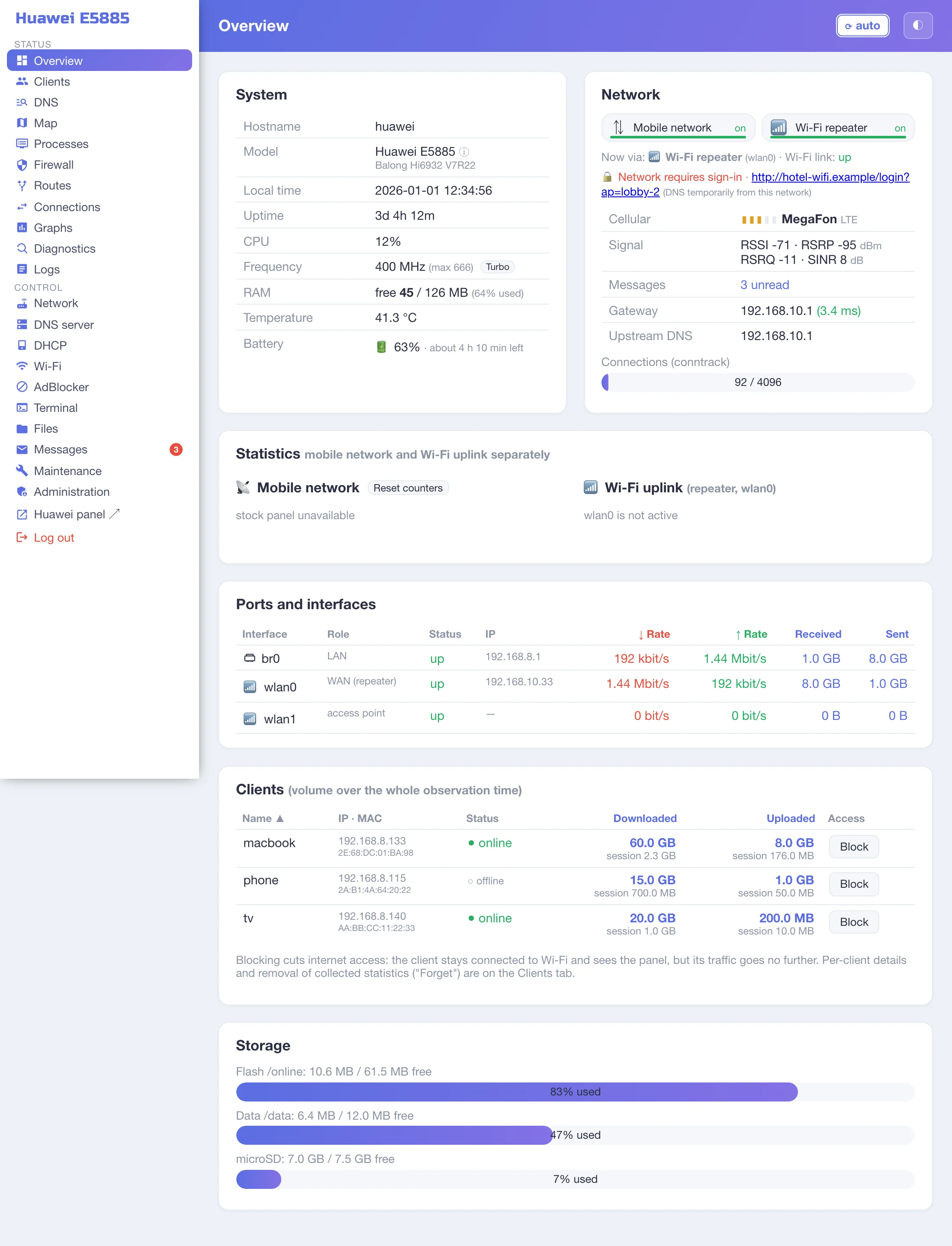
What is inside the box
The firmware on the router is the original one, with root access, not OpenWrt. The CPU is a dual-core ARMv7, but Linux sees one core: the second is taken by the modem. The frequency is no higher than 666 MHz. Out of 256 MB of memory, Linux gets 128.
Writing for it is inconvenient:
- the system partitions are mounted read-only, and the only partition for my own files that is mounted right after boot has about 10 MB free out of 61.5;
- packages do not install:
opkg installfails, and the package archive has to be unpacked by hand; - there is no compiler on the router, and no cron either;
- busybox is built in a way that does not resolve names:
pingby name answersbad address.
So the panel is built on a laptop for GOARCH=arm and goes to the router as a single file.
One binary with no dependencies
The panel is built into a single static Go binary, and there is nothing in it besides the standard library. The pages are embedded with go:embed, there are no external scripts or fonts, and it opens the same way without internet. Inside are 56 Go files and 38 test files, 17,845 lines without tests. The binary weighs about 8.8 MB.
Port 80 on the router is taken by the stock Huawei panel. I do not disable it: Wi-Fi and modem settings are changed through its API. My panel listens on a separate port, and the settings have a switch that swaps them: mine answers on 80, the stock one moves to 3000. If my process stops, the redirect rules are removed, and port 80 serves the stock panel again.
In the first version those rules had no destination address, and my panel received all transit traffic of the clients to port 80, not only requests to the router itself.
A watchdog looks after the process, a shell loop that runs every 15 seconds. It brings the panel up if it has crashed, and removes the DNS interception if its resolver has stopped listening, otherwise the clients would be left without name resolution.
The page before login
No password is needed to find out whether the router works. Before login there is a status page: whether there is internet, the operator and signal level, speed, what is left of the data plan and the battery, how many clients are connected.
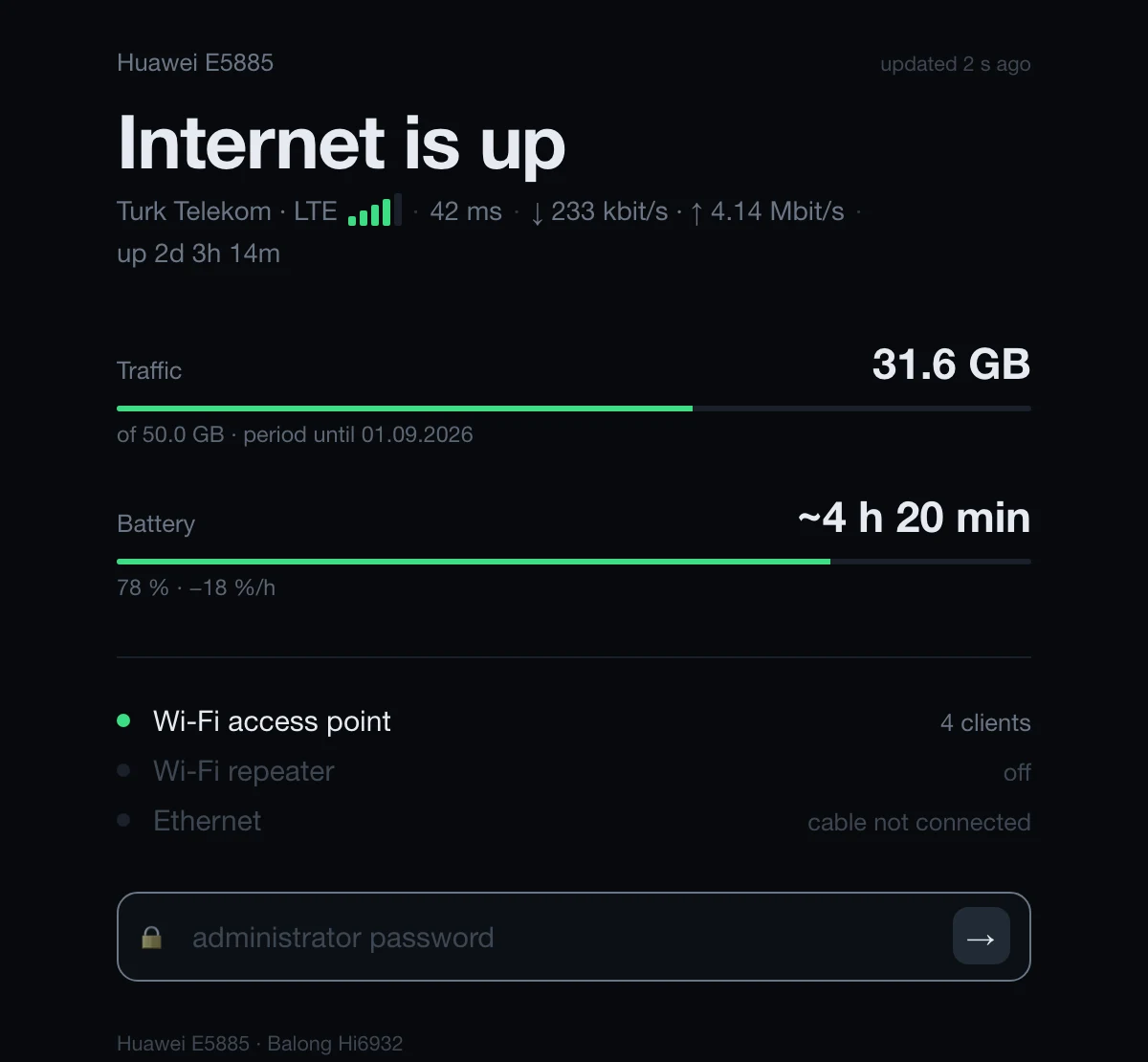
The set of fields on it is hardcoded: no client list, no serial numbers, no versions. There is a test for this: one extra field in the response, and it fails. The state snapshot is built on request and kept for 8 seconds, so frequent page refreshes do not load the router.
Ad blocking and memory
Ads are blocked at the DNS level: a domain from a list gets a "does not exist" answer, and the log shows which list blocked it.
The first version kept 164 thousand domains in a map, the process took up to 42 MB, and the system killed it every 35 seconds. A sorted slice of strings with binary search cured that.
Then the lists grew to five and the domains to 450 thousand. In a slice of strings that is 450 thousand objects, which the garbage collector walked on every cycle. The heap has a ceiling of 22 MB, and the collector ran without a break, taking 40% of the CPU at full idle. What helped was laying the domains end to end in one byte block with a numeric index and searching directly in it. The collector has nothing to walk there: the CPU is busy at 2-3%, and the process takes 25 MB instead of 29.6.
The CPU also went into launching external commands. At 666 MHz every busybox call from a Go process is expensive, and when there were fewer polls, the load dropped from 6.5 to 2.4%.
The connection map
The "Map" tab shows where the clients go: outgoing connections are drawn on a world map and refreshed every three seconds. Traffic is split into 15 categories.
The map needs a GeoIP database, and it weighs 65 MB with 128 MB of memory for everything. The database sits on a microSD card, and my own parser of the format reads it through mmap, so it is never loaded into memory in full. The map costs the process about 5 MB.
SMS and USSD
The operator sends service SMS, and gives the remaining data plan in response to a USSD request. The stock panel can do both, and I moved this into mine. It reads, sends and deletes messages and sends a notification about a new SMS to the phone. After a USSD request it closes the dialog whatever the outcome, otherwise the modem would stay stuck in it. Before sending an SMS the panel asks for confirmation: in roaming it costs money.
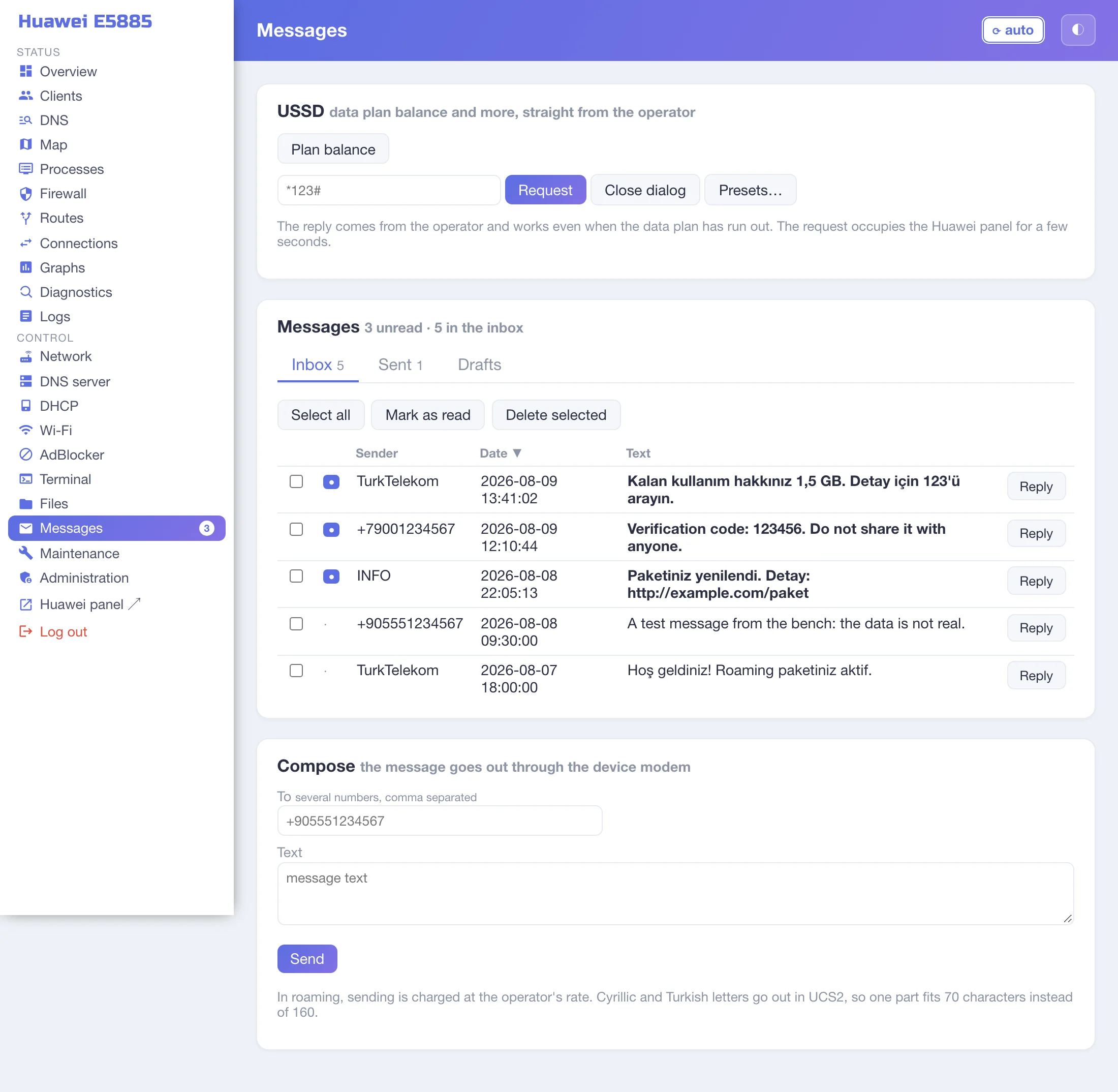
The stock panel is designed for a single user. The session is bound to the client address and lasts five minutes without activity, and the panel answers frequent logins with an error. Login to it goes through SCRAM, and Huawei has the key and the message in HMAC swapped relative to RFC 5802: an implementation that follows the standard is rejected with the correct password.
Someone else's Wi-Fi with a portal
In a hotel the router works as a repeater: it connects to the hotel network and shares it further. Such a network first requires opening a login page, and the clients behind the router do not see that, they just have no internet.
For this case the panel has a "portal" mode. Every two minutes it makes a probe request and tells four cases apart: there is internet, the network requires login, there is no uplink, DNS is spoofed. If the network requires login, the panel shows a link to the page and temporarily sends the clients' DNS queries to the resolver of that network, because only it knows the name of the login page.
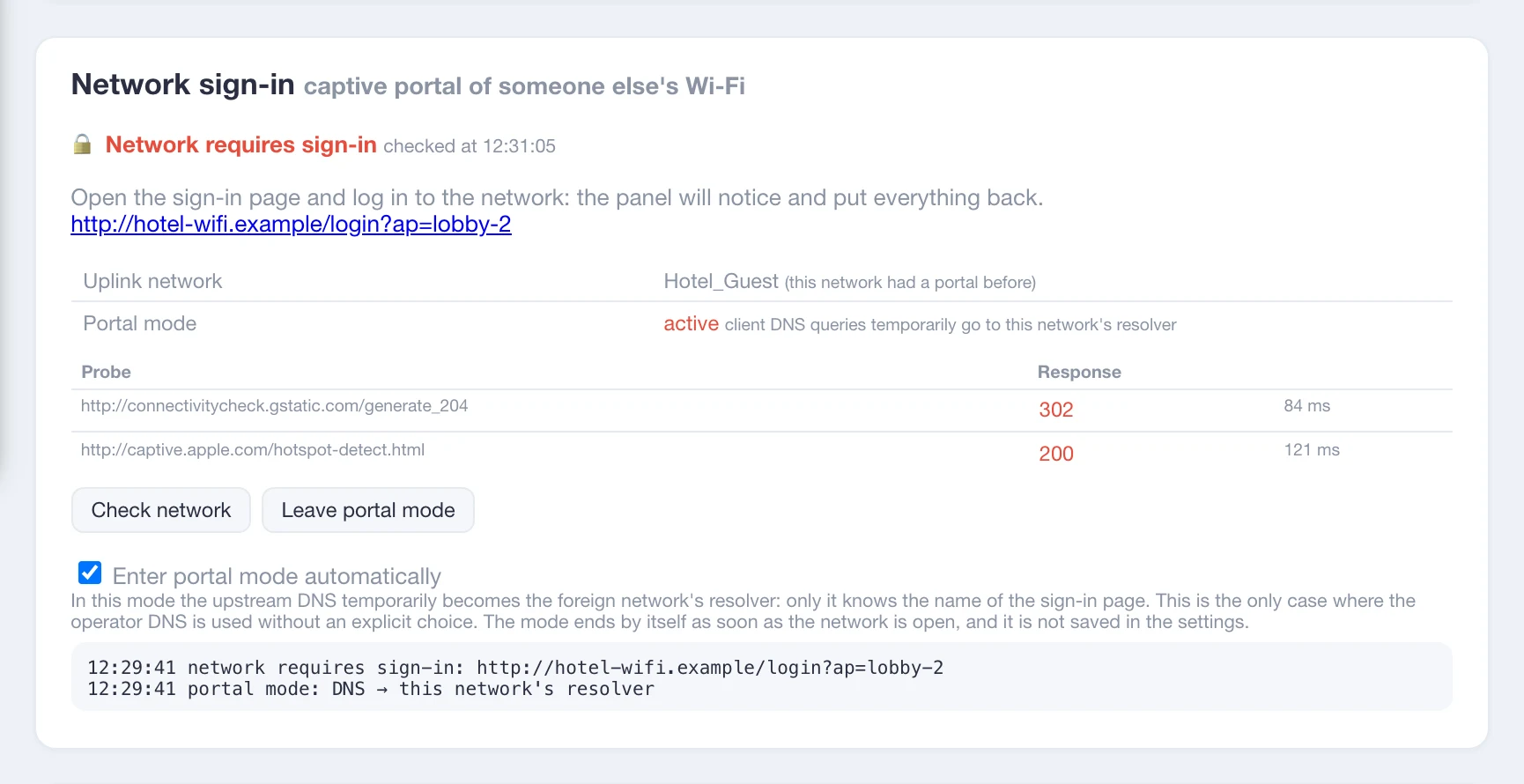
The mode is built and covered with tests, but I have not tried it in a real hotel.
The repeater itself would not connect to any network at first: the panel process lacked the paths to the system utilities, and the stock service was managing the same interface at the same time. It started working through the stock profile API. There it turned out that the Order field sets not the priority but the slot number, while the priority is determined by the order of the blocks in the request.
Switching between the mobile network and Wi-Fi drops the router's own access point for 10-30 seconds: the firmware rebuilds the radio interfaces. In that time the laptop moves to another known network and does not come back. I now test such things over a cable.
Counters that lied
Client traffic was first counted by iptables rules. Under load the counter showed 27 KB while 26.6 MB went through the router: it has a hardware accelerator, and the packets bypass netfilter. Now the bytes come from the Wi-Fi driver.
The driver counter is not monotonic, and the first version credited a phone with 125 GB uploaded overnight. Counting by radio frames also overstates the volume: a client downloaded 131.5 MB, and the counter grew by 158.8.
The load at idle stayed around 20. Twenty modem threads constantly hang waiting for I/O and end up in the load average, so the panel subtracts those twenty. And the uptime in the firmware log showed 9583 hours over 125 power-ons: the field turned out to be in minutes.
A test bench without the router
Editing the layout right on the router is expensive: an ARM build, an upload and a restart for one line of CSS. So the panel has a bench mode. It runs on a laptop and serves API responses from files. A synthetic set lives in the repository, and a snapshot of the live router with real addresses does not get into it. The screenshots in this article were taken on the bench.
The bench helped in another way too. There is one router, and git worktrees do not isolate it. One agent session started from a stale copy of the code, and each of its uploads wiped out the map tab on the router, which another session was building at the same time.
In two months, from July to the end of August, the project collected 91 commits. A pocket router turned into a router that shows what is going on inside it: who is connected, where they go and how much of the data plan is left.
Tags: Linux, Monitoring, Networking, Self-hosting
Read next
Where a network anomaly detector should live
A script on the router or logic in a flow collector that is already running - how the plan shrank by half and what a run over the history showed.
Raspberry Pi 5: the "reboots" that never happened
The journal showed the server rebooting, and the culprit turned out to be a clock without a battery. Plus one real outage and noise from Docker.
Segmenting a home network on MikroTik without VLANs
A second subnet on the same bridge, trusted devices by list, and services with their own address in the segment of the people who use them.
Comments